
Documentation
Outline
VFX Loom 1.0 reference for the Outline node.
Filters
processing.outline 
Overview
Draws an alpha-aware outline around visible pixels.
Alpha-neighborhood outline with configurable position, color, opacity, and normalized thickness.
- Category
- Filters
- Internal ID
processing.outline- Version
- VFX Loom 1.0
Inputs
| Input | Type | Required | Default | Meaning |
|---|---|---|---|---|
| in | Image | Required | — | See the overview for the node's documented behavior. |
Properties
| Property | Type | Default | Animatable | Range / options | Effect |
|---|---|---|---|---|---|
| Thickness | Scalar | .02 | Yes | Hard 0..0.25 | Animatable control; changing it over time varies the node response. |
| Color | Color | (1,1,1,1) | Yes | — | Animatable control; changing it over time varies the node response. |
| Opacity | Scalar | 1 | Yes | Hard 0..1 | Animatable control; changing it over time varies the node response. |
| Position | Enum | Outside | Not declared | Outside · Inside · Both | Selects the position behavior; each option changes the operation described in the overview. |
Outputs
| Output | Type | Meaning |
|---|---|---|
| out | Image | The production node output described by the overview. |
Usage
In practice
- Use Outline when the graph needs Draws an alpha-aware outline around visible pixels.
- Alpha-neighborhood outline with configurable position, color, opacity, and normalized thickness.
- Place it after the image or mask it should process, and check its alpha and edge behavior before using the result in a tiled graph.
Examples
These examples show Outline in supplied VFX Loom graph setups. Each graph link opens the corresponding node reference; the explanation below the media is specific to this node's role in that setup.
Shape / Warp / Glow with a moving wave branch
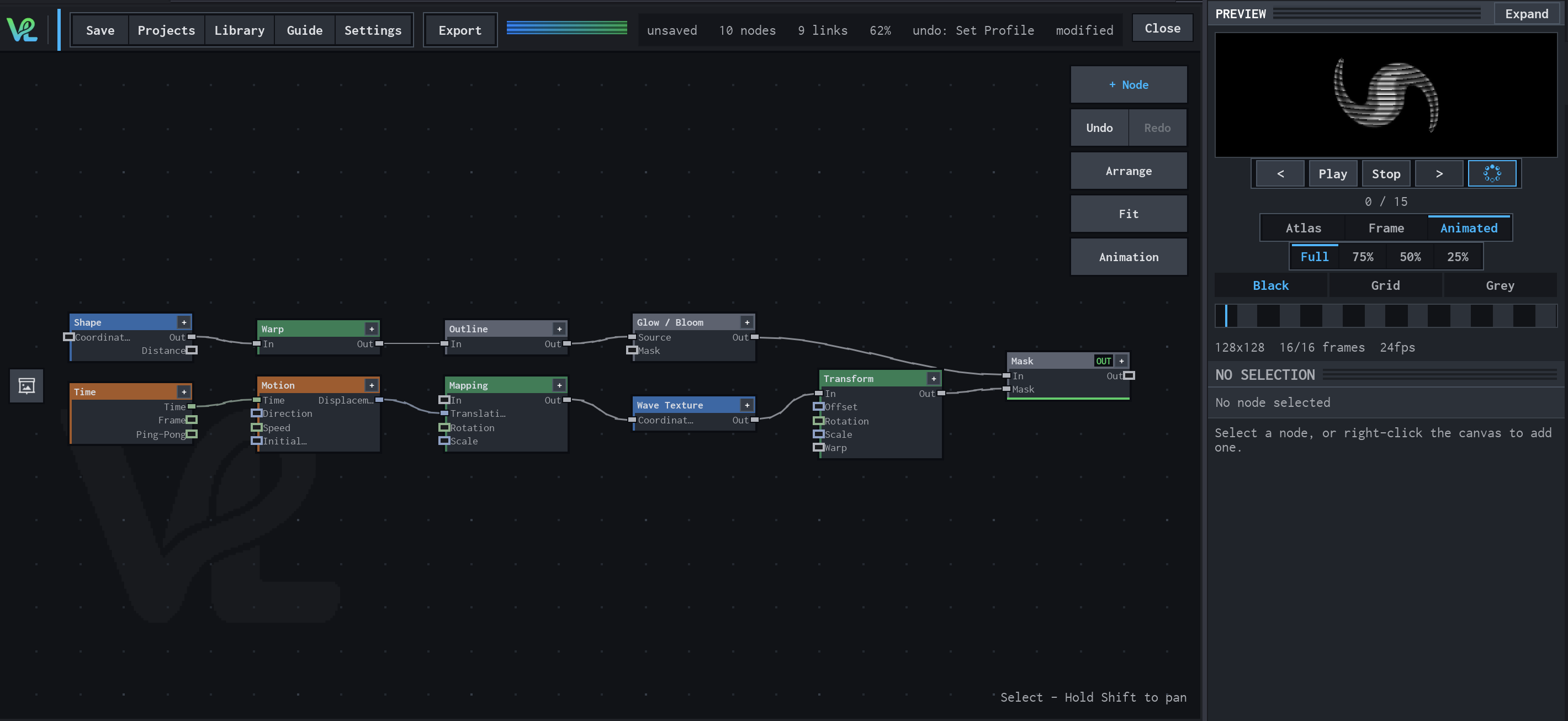
Two branches meet at Mask: a Shape branch is warped, outlined, and bloomed, while Time drives Motion → Mapping → Wave Texture → Transform to create a moving secondary field.
How Outline contributes
Outline extracts the visible edge of the warped form. This gives the upper branch a crisp contour that Glow / Bloom can expand.
Notes / limitations
- No step is declared for Thickness or Opacity.